People Playground · Free download
Redux Framework 0.5.3 + Dependencies
This is REQUIRED for both Dragon Ball Redux Beta and Demo. The download contains [RXS] Redux Framework and seven support mods.
WITHOUT THE FRAMEWORK, REDUX WILL NOT WORK CORRECTLY.
Redux loads shared VFX and audio from [RXS] Redux Framework. Download this pack, install all eight mod folders, then enable [RXS] Redux Framework before enabling Redux. Installing only the Redux mod ZIP is not enough.
Creators
Credits & acknowledgements
Redux Studios DX thanks the creators and teams behind these included third-party mods.
Also included: Floating Bug Fix and Ultimate Knockout Fix.
Required download
Get the complete framework + dependency pack
This is the pack for both Beta and Demo. It contains [RXS] Redux Framework 0.5.3 (the newest supplied version) plus all seven support mods. The shared VFX/audio framework is required for Redux. Download this NEW pack even if you installed a previous framework; its DLL and effects have been updated.
The download arrives as a single ZIP. Because Cloudflare Pages limits individual static file sizes, the browser assembles the ZIP from six verified parts. Keep this page open until the download starts. When launched from a Demo/Beta download this pack starts automatically; if a browser blocks it, press the download button here.
IMPORTANT UPDATE: REPLACE YOUR OLD FRAMEWORK AND REDUX FILES. Close the game, back up your folders, copy the new framework OVER the old one and copy the new Demo/Beta release OVER the matching old one. Accept file replacement. Never create extra nested copies.
Required order
INSTALL AND ENABLE FRAMEWORK FIRST
- Close People Playground completely and back up your existing Redux folders.
- Download the combined ZIP, then extract its eight mod folders directly into
People Playground/Mods/. If you already have Redux Framework installed, copy the newRedux Frameworkfolder ON TOP OF the existing folder and choose MERGE / REPLACE old files. Do not install an extra duplicate or nest the folders. - Updating Redux too? Extract the new Demo or Beta release into the corresponding existing
Dragon Ball Redux Demo ReleaseorDragon Ball Redux Beta Releasefolder, and choose Replace files in destination. Keep Demo and Beta separate. Never move Redux Framework inside Redux. - Go to the Mods menu and enable [RXS] Redux Framework FIRST. Make sure it has its own
mod.jsonandreduxframework.mark. - Enable the other seven required dependencies: Easier Arm Selection, Automatic Limb Repositioning, Mulligan, ZeroOne Core, Pickup Advanced, Floating Bug Fix and Ultimate Knockout Fix.
- Only after the framework and support mods are enabled, enable Dragon Ball Redux Beta or Dragon Ball Redux Demo. Restart when the game requests it.
- If upgrading from a pre-framework Redux build, remove only
soniceffects,redux_vfx,db,redux_aura,auraandimpactfrom the Redux folder'sUnion/Bundles/. These six now live in Redux Framework. Do not delete your other Redux bundles. New framework-compatible Redux releases already omit the duplicates.
Eight folders in the ZIP: Redux Framework, armselection, floatingbug, knockoutfix, limbreposition, muligan, pickup and zeroonecore.
IMPORTANT: Installing the ZIP is not enough. Redux Framework must be ENABLED in the game before you enable Redux, or effects and audio may fail.
People Playground 1.28
Need help patching People Playground?
Legacy Patcher 0.2.4 is available as a separate download. It may help older C# mods load in People Playground 1.28. It does not replace [RXS] Redux Framework or any of the seven required support mods. Read the security warning before downloading.
USE AT YOUR OWN RISK. C# mods can run programs, modify files and access your data. Only install trusted mods, never trust a random DM copy, and keep Reject Shady Code enabled.
Optional setting
Hide Union asset-conflict pop-ups
These notifications can become repetitive when using Union mods. The setting hides the notifications only; it does not resolve real asset collisions.
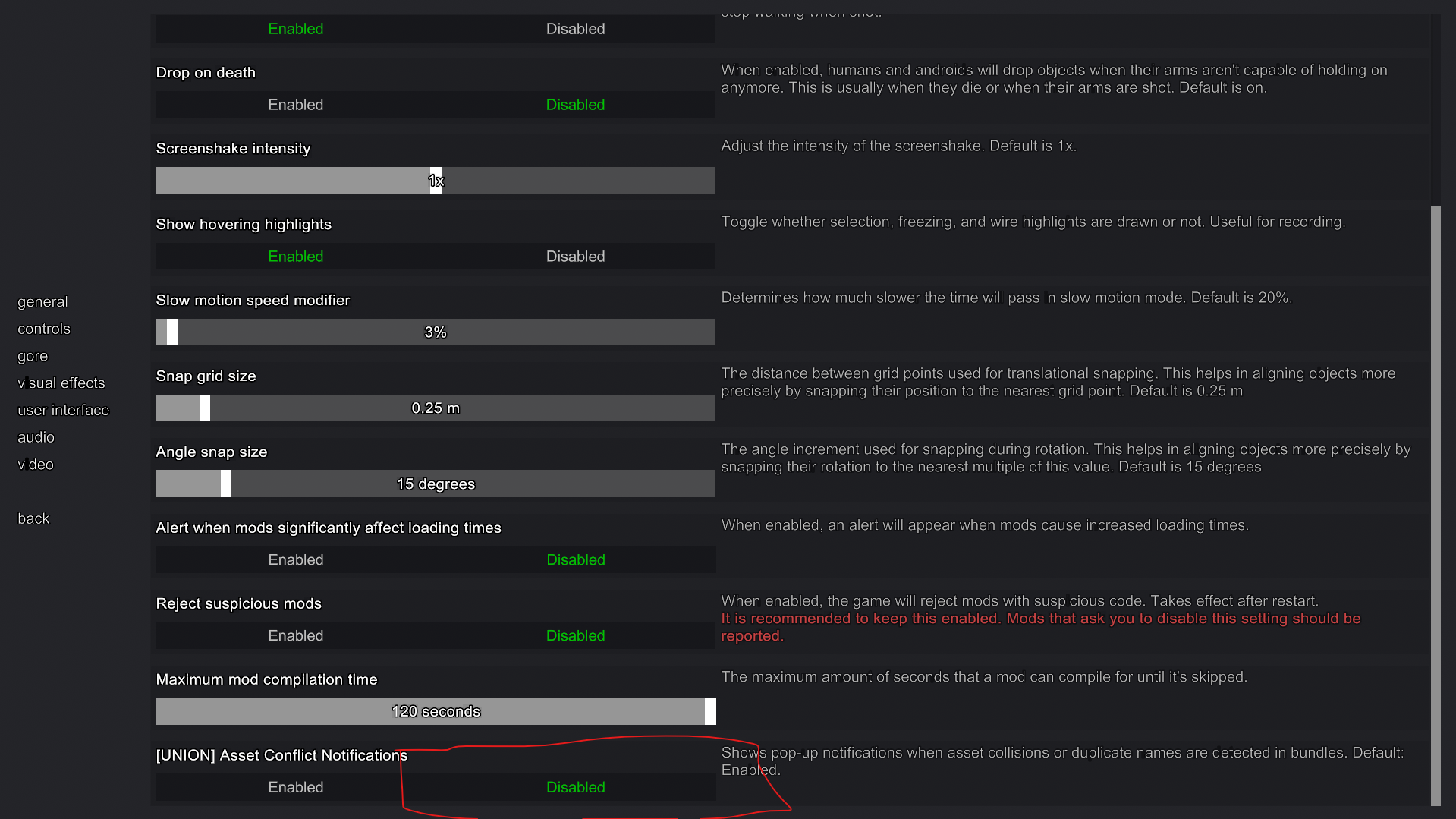
Keep Reject suspicious mods enabled; it is a separate game-security setting and is not needed for turning off Union pop-ups.